
SongAI - AI Music Generator
StudioLLCMusic & Audio
4.6268.00 Reviews
- Version
- 1.2.0
- Installs
- 50.00K
- Age Rating
- Everyone
Screenshots
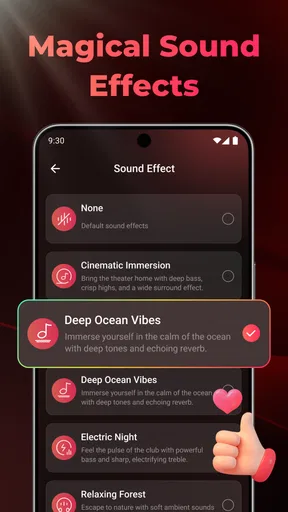
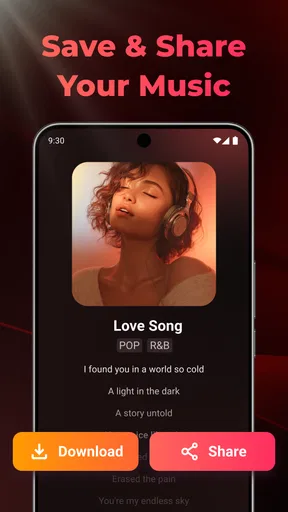
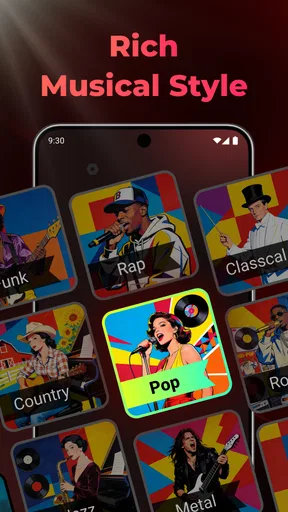
Our Review of SongAI - AI Music Generator
 Analysis by Appyee
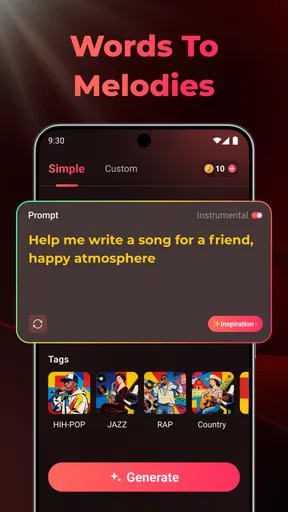
I approached SongAI as a quick music-making tool rather than a replacement for a full recording studio. Its central idea is simple: turn a written idea into a song with the help of artificial intelligence, including lyrics, beats, and a generated vocal presentation. In my experience, that focus makes it most interesting when I want to move from a vague concept to something I can actually hear, without first learning a digital audio workstation.
The app comes from StudioLLC and sits in the Music & Audio category. It is free to install, aimed at Everyone, and has reached over 50 thousand installs. Its average rating is 4.6 from around 900 ratings, which suggests that the basic concept is connecting with a meaningful number of listeners and hobbyist creators. I would still treat it as an idea generator first: useful for sketches, experiments, and personal projects, but not automatically the final step in a professional production.
Turning a rough idea into a complete musical sketch
The most valuable capability here is not simply making a tune. It is the way the app can connect several parts of a song concept at once. A short prompt can become a combination of lyrical direction, rhythm, and vocal character, giving me something more complete than a blank project screen. That matters because the hardest part of starting music is often not the technical editing; it is deciding what the first usable version should sound like.
With a conventional music app, I usually have to select sounds, create a rhythm, write words, record a take, and then adjust everything until the parts feel related. SongAI compresses that early process into a single creative jump. The result is especially helpful when I already know the mood or subject I want but do not yet have a melody or arrangement in mind.
I found the capability most useful as a way to test direction. A song idea can sound exciting in my head but lose its appeal once it becomes audible. Hearing a generated version quickly helps me decide whether the concept deserves more work. That saves time compared with polishing lyrics or building a beat before discovering that the central idea does not carry well.
There is also a practical benefit for people who do not consider themselves musicians. Someone planning a short video, a personal greeting, a playful social post, or a small creative project may want an original musical atmosphere without studying chords and rhythm first. The app lowers that entry barrier. I can begin with language rather than technical music knowledge, which makes the first session feel less intimidating than opening a traditional production suite.
At the same time, I would not confuse a generated song with a finished composition. A complete-sounding output can still have a generic emotional shape, an awkward lyrical phrase, or a vocal delivery that does not match the exact feeling I had in mind. The strength is speed and possibility, not guaranteed artistic precision. Its real advantage is shortening the distance between an idea and an audible draft.
What the first session feels like
The app is easiest to understand when I treat each attempt as a creative prompt rather than a final order. I start with the subject, emotional direction, or scene I want the song to suggest. More specific wording is generally more useful than a broad request, because a narrow idea gives the generation a clearer identity to work with. Instead of stopping at “make a happy song,” I would describe the situation, energy, and kind of listener I have in mind.
That approach produces a better basis for judging the result. I listen for three separate things: whether the words communicate the idea, whether the beat supports the mood, and whether the vocal style makes the song feel believable. These elements can succeed independently. A strong rhythm may carry a weak lyric, or an interesting lyric may be paired with a vocal tone that feels wrong. Separating those reactions helps me decide what to keep and what to revise in the next attempt.
One useful workflow is to begin with a deliberately simple concept. I would rather test one clear mood than overload the request with several genres, stories, and emotional changes. Once the basic direction works, I can introduce a more unusual subject or a sharper contrast. This makes it easier to identify whether an unexpected result came from the concept itself or from asking for too much at once.
I also recommend saving the wording that produced a promising result before experimenting further. In an AI music workflow, a small change in the description can shift the entire character of a song. Keeping a personal record of successful prompts gives me a repeatable starting point instead of forcing me to reconstruct a good idea from memory. This is a simple habit, but it turns random experimentation into a more controlled creative process.
Another practical tip is to judge the output at low volume and on ordinary headphones, not only in the most flattering listening setup. A generated track may seem impressive at first because it is new, yet its chorus, words, or vocal balance may become less convincing after repeated listening. If I still like the central hook after stepping away and returning later, the idea has more potential than a first-impression novelty.
Using it for a realistic everyday project
Imagine I am preparing a short birthday video for a friend. I do not need a full album, and I may not have the time or equipment to write, perform, and mix a custom song. I can use the person’s personality, the event’s atmosphere, and a few memorable details as the creative direction, then listen to the generated result as a possible soundtrack. Even if I do not use it unchanged, it gives me a musical reference for the video instead of leaving me with a silent timeline.
This scenario shows where the app feels more useful than a standard streaming service. A playlist can provide a polished mood, but it will not be shaped around my particular subject. SongAI can help me explore something personal and specific. The trade-off is that a familiar commercial track may sound more refined, while the generated piece may feel more directly connected to the occasion.
For a songwriter, I see another worthwhile use: creating a temporary demonstration of a lyric idea. The generated vocal and beat can reveal whether the words have a natural flow or whether the emotional emphasis falls in the wrong place. I would not rely on the output as the definitive performance, but it can expose structural problems that are easy to miss when reading lyrics silently.
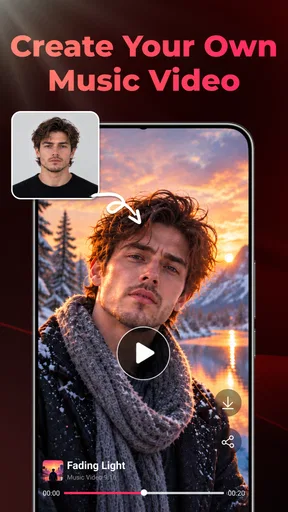
For a video creator, the app can work as a mood board in audio form. I can test whether a scene wants something energetic, reflective, playful, or dramatic before spending time searching through conventional music libraries. The generated track may not be the final soundtrack, but it can clarify the direction I want. That makes the tool useful even when its output is ultimately replaced.
Where it differs from ordinary music tools
Traditional beat-making apps give me more direct control. I can place individual drum hits, choose instruments, adjust timing, and build a structure piece by piece. That is the better route when I already hear the arrangement clearly or need exact control over every bar. SongAI is more appealing at the opposite end of the process, when I have a concept but no practical starting arrangement.
Lyrics apps may help with wording, and voice or recording apps may help capture a performance, but they usually leave me responsible for connecting those parts. SongAI’s attraction is the combined sketch: words, beat, and vocal presentation arrive as one connected attempt. That saves setup time, although it also means I give up some of the fine-grained control I would have in separate tools.
Compared with a streaming service, the experience is exploratory rather than passive. I am not choosing from an established catalog; I am asking for a new interpretation of an idea. That can feel more personal, but it also requires patience. A playlist delivers reliable polish immediately, while an AI-generated track may need several creative passes before it feels close to the intended mood.
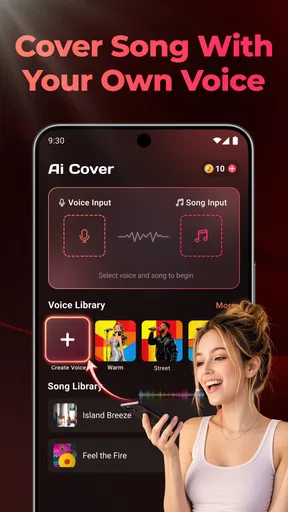
Compared with recording myself, the app is less demanding physically and technically. I do not need to perform a vocal take just to hear how a song might work. However, a personal recording carries natural imperfections and identity that a generated presentation may not reproduce. If the emotional point depends on my own voice, the app is better used for preparation than substitution.
The trade-off between speed and control
The biggest limitation is inherent in the same feature that makes the app approachable. A prompt-based workflow can produce a surprisingly coherent sketch quickly, but I am not shaping every musical decision directly. If the rhythm is close but not quite right, or the vocal emphasis misses an important word, I may need to try a new direction rather than make one precise adjustment.
That can be frustrating for experienced producers. Someone who wants detailed editing, a carefully arranged instrumental, or a repeatable studio process may outgrow the app quickly. A full production environment is slower at the beginning but more dependable when exact results matter. I would choose SongAI for discovery and early drafting, then move to a more controllable tool when the song needs deliberate engineering.
The generated lyrics deserve careful attention too. I would never assume that a fluent-sounding line is automatically meaningful, original in spirit, or suitable for a public project. I read every line, check whether the wording fits the intended audience, and remove anything that feels vague or out of character. This is especially important for personal songs, where an inaccurate detail can undermine the whole emotional purpose.
There is also a cost consideration despite the free entry point. The app is free, but in-app purchases range from $4.99 to $129.99 per item. That wide range means I would explore the basic experience first and decide how seriously I plan to use it before spending money. Occasional users may be satisfied with limited experimentation, while frequent creators should think about how much repeated generation is worth to them.
I would also keep expectations realistic about originality and ownership in any AI-assisted music workflow. The app can help produce a useful creative result, but I would review the terms presented inside the app before using generated material commercially or as the centerpiece of a public release. That is not a criticism unique to this tool; it is a sensible step whenever software helps create music on a user’s behalf.
Who will get the most from it
SongAI is a good fit for curious beginners, casual creators, writers who want to hear lyric ideas, and people making small personal projects. It is particularly appealing if the blank page is the main obstacle. The ability to describe an idea and receive a song-shaped result gives me something concrete to react to, which is often more motivating than staring at an empty timeline.
It can also suit educators or families looking for a playful way to discuss songwriting, provided an adult handles expectations around purchases and public sharing where appropriate. The Everyone content rating makes the app broadly approachable, but age suitability does not remove the need for normal supervision around accounts, spending, and the kind of prompts children enter.
I would recommend skipping it if your main goal is professional mixing, precise instrumental programming, live performance preparation, or a highly personal vocal recording. In those cases, a dedicated workstation, an instrument app, or a conventional recording setup will give you more useful control. The same applies if you dislike iterative experimentation and want the first result to match a detailed musical plan exactly.
The current version is 1.2.0, and the app was released on August 4, 2025. Those details place it in a relatively early stage of its life, so I would approach it as a developing creative tool rather than a mature replacement for every part of music production. That makes the quick idea-to-song workflow even more important: its value is clearest when I use it for exploration, not when I demand the depth of a complete studio.
My recommendation after using the concept seriously
I like SongAI because it addresses a real creative problem: many people have musical ideas but lack the time, confidence, or technical knowledge to turn them into something audible. Its combination of lyrics, beats, and generated vocals makes the first step unusually approachable. I can use it to test a theme, find a direction for a video, or discover whether a lyric has enough rhythm to become a song.
My recommendation is to use it with an editor’s mindset. Give it a focused idea, listen critically, keep the strongest parts, and treat weak results as information rather than failure. Save promising prompts, check every lyric, and decide in advance whether you need a rough sketch or a polished final track. That workflow gets more value from the app than simply pressing generate and accepting the first outcome.
For me, the deciding question is not whether it can replace a musician or a studio. It cannot offer the same kind of control or personal performance. The better question is whether it can help me cross the awkward gap between imagination and experimentation. In that role, SongAI is a genuinely useful starting point for turning musical thoughts into something I can hear, judge, and develop.
Verdict
Strengths of SongAI - AI Music Generator
- Creates original songs from simple text prompts.
- Offers multiple music styles and mood options.
- Useful for quick demos, ideas, and creative experiments.
- Can inspire lyrics, melodies, and complete song concepts.
- Accessible interface for users without music production skills.
Limitations of SongAI - AI Music Generator
- Generated vocals may sound artificial or inconsistent.
- Results can vary greatly between similar prompts.
- Advanced editing and mixing tools may be limited.
- Some features or exports may require a paid subscription.
- Commercial usage rights should be checked before publishing songs.
Similar Picks in This Category
View All
YouTube Music
Google LLC4.4

Samsung Music
Samsung Electronics Co., Ltd.3.8

Spotify: Music and Podcasts
Spotify AB4.3

JioSaavn - Music & Podcasts
Saavn Media Limited4.3

Lark Player:Music Player & MP3
Lark Player Studio - Music, MP3 & Video Player4.6

StarMaker: Sing Karaoke Songs
SKYWORK AI PTE. LTD.4.3
Frequently Asked Questions
What is SongAI - AI Music Generator, and how does it work?
SongAI - AI Music Generator is an app designed to create original music with the help of artificial intelligence. After entering a prompt, selecting a style, or describing the mood and theme you want, the app processes your request and generates a song or musical composition. Results can vary, so experimenting with different descriptions usually produces more suitable tracks.
Can SongAI create complete songs with vocals and lyrics?
Depending on the version and features available in your region, SongAI may generate instrumental music, lyrics, vocal performances, or a combination of these elements. The quality and structure of each result can differ, especially when prompts are vague. Users who want more coherent songs should clearly describe the genre, mood, language, instruments, vocal style, and subject matter.
Is the music generated by SongAI free to use commercially?
You should carefully review SongAI’s current terms of service and the license attached to each generated track before using the music commercially. Free plans may include limitations, attribution requirements, watermarks, or restrictions on monetization. Ownership and usage rights can also depend on the subscription tier, so creators should confirm the rules before publishing songs in videos, advertisements, streaming services, or games.
Does SongAI require an internet connection or an account?
SongAI generally relies on online artificial-intelligence processing, meaning an active internet connection is normally required to submit prompts and generate music. Some features may also require registration, login, or a paid subscription. Availability can vary between Android and iOS, and certain tools may be limited by region, account type, daily credits, or the app’s current plan structure.
Are there any limitations or privacy concerns to consider before downloading SongAI?
Before installing SongAI, check the permissions and privacy policy to understand how prompts, uploaded audio, account details, and generated content are handled. AI music apps may impose limits on generation length, export quality, file formats, or the number of daily creations. Also remember that generated results may occasionally contain unexpected lyrics, repetitive sections, or styles that do not perfectly match your request.
